
I、Schiele Door Operator (3-button Type)
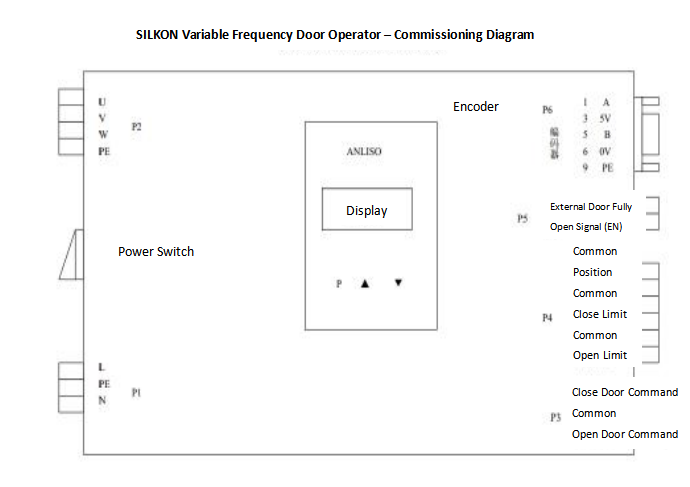
Door Width Self-Learning Procedure
1. Disengage the landing door, open the car door halfway, set parameter F0018 to 1 on the door operator, and lift the mechanical lock hook.
2. The door will first close fully until it reaches the in-place position, then open fully until it reaches the in-place position. The door operator will stop to complete the process.
(Note: If the door fails to open or close fully on a specific floor, try performing the door width self-learning with the landing door engaged.)
(For details, refer to the Commissioning Manual.)
The NICE900 door operator (Monarch door operator) uses the same buttons and operation method
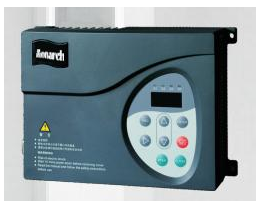
The NICE900 door operator (Monarch door operator) uses the same buttons and operation method
Inspection & Door Width Self-Learning Procedure
1. Check the door operator parameter F909 = 2 (Door Close In-Place Signal).
2. Door Width Self-Learning Steps:
a. Disengage the landing door, open the car door halfway.
b. On the door operator, set F002 = 2 (Manual Mode) and F600 = 1, then press the OPEN key on the door operator inverter.
c. Remember to lift the mechanical lock hook.
d. The door will operate as follows: first close fully until in-place → then open fully until in-place → finally close fully until in-place again. The door operator will stop to complete the learning process, and the door knife will retract.
e. Open the door halfway again, set F002 = 1 (Auto Mode), then press the Inspection Run button—the door will close, and the door knife will extend.
3. After learning is completed, the door knife will retract during normal operation. Modify the mainboard parameter: F6-42 bit3 = 1.
(For details, refer to the Commissioning Manual.)
III、 OLVF200-1 Door Operator (Ouling Brand)
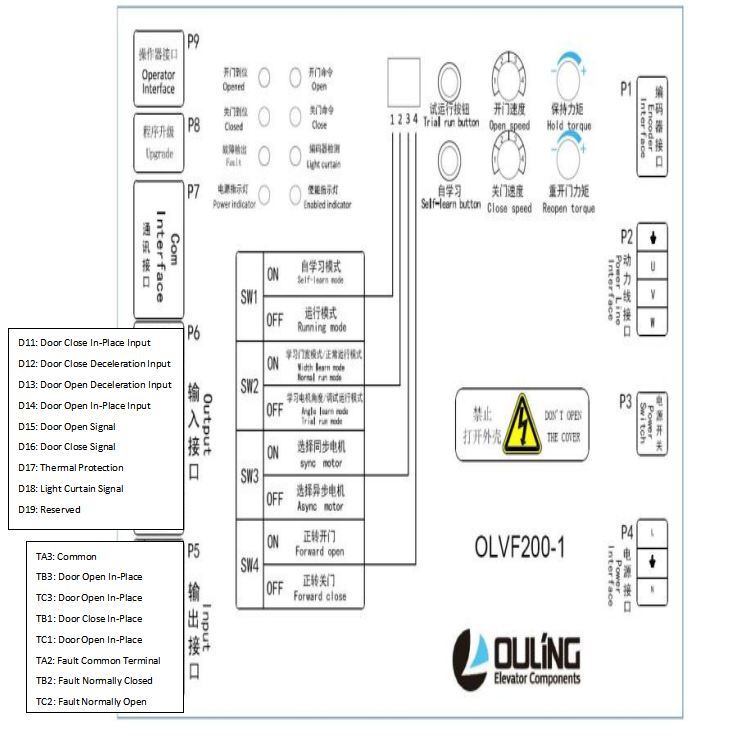
3. Commissioning Procedures
Note: The inverter comes with preset parameters from the factory. After the door operator is assembled, motor angle self-learning and door width self-learning must be performed before test operation.
3.1 Motor Angle Self-LearningToggle SW1 to ON and SW2 to OFF, place the door operator in the half-open position, and press the "Self-Learning" button. The door will move slightly at this time.Self-learning is completed when the movement stops.
3.2 Door Width Self-LearningToggle SW1 to ON and SW2 to ON, place the door operator in the half-open position, and press the "Self-Learning" button. The door will start to operate in the following sequence: Close → Close In-Place → Open → Open In-Place → Close → Close In-Place. Self-learning is completed. If the learning direction does not match the description, toggle SW4.
3.3 Test OperationToggle SW1 to OFF and SW2 to ON. Short-circuit DI5 and COM to open the door; the door open in-place indicator on the panel will light up when the door is fully open. Short-circuit DI6 and COM to close the door; the door close in-place indicator on the panel will light up when the door is fully closed. If the test operation direction does not match the description, toggle SW4 and perform reciprocating tests more than 5 times.
(For details, refer to the Commissioning Manual.)
IV、NSFC01-G220 (Shenling Door Operator)
NSFC01-G220 Controller Quick Commissioning Manual
CAUTION!!!
The door operator has been pre-matched and commissioned before leaving the factory. Do not modify the factory-default wiring during on-site installation and commissioning. Please contact the manufacturer if you have any questions. Thank you for your cooperation!
Door Width Learning Commissioning
1. Verify that there is no mechanical obstruction when the door operator opens or closes the door.
2. Confirm that the door close in-place switch input signal is valid. The method is as follows:
2.1 Confirm that one set of the switch wires has been connected to the GND and IN6 ports of the inverter's CN3 connector, as shown in Figure 1.
2.2 Place the door in the closed position; the monitored FA18 menu should match the status shown in Figure
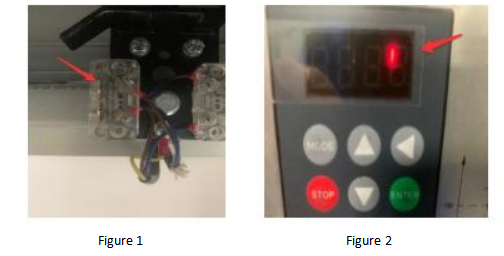
I、Start Door Width Learning: First set F001 to "4", then set F003 to "1". At this time, the door operator will first tighten the door knife in the closing direction, then start opening the door. When the door is opening, remember to lift the door knife lock hook. The door will open to the door open limit position, then close to the door close limit position. The display will show "0" flashing, indicating that the door width learning is completed, and the door width data will be automatically saved.
(For details, refer to the Commissioning Manual.)
V、Zhanpeng Door Operator
1. Set L2=01, exit the parameter setting, and the door operator self-learning will start automatically.
(For details, refer to the Commissioning Manual.)
VI、Wittur Door Operator
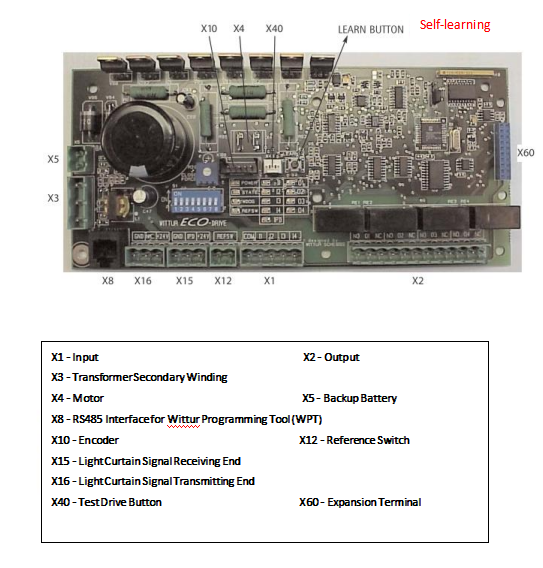
Preparation and Learning of Door Parameters
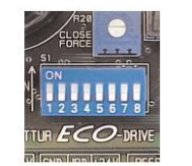
1. DIP switches must be set as required. Refer to Chapter 7: "DIP Switches".
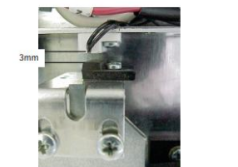
2. Adjust the reference switch so that the reference switch and the electromagnet are opposite when the door is closed (the gap between the switch and the magnet should be 3mm).
3. DIP Switch S1/1 (Test Drive) must be in the ON position.
4. Place the door in the closed position and verify that the door knife is closed (the landing door lock is open).
Now, manually push open the door panel and then close it manually—the door slide plate must contact the rubber buffer pad.
5. Apply power through terminal (D1).
Immediately press the Self-Learning Button after power is applied.
6. Now, perform door closing under the control of the test button.
7. At this time, the door operation direction may be inconsistent with the command. Fully close the door using the test drive button (the reference switch indicator light must be illuminated).
8. If the motor operation direction is incorrect, the electronic components will correct the motor rotation direction when the reference switch is activated, and then restart the self-learning process.
If there is no reference switch, the motor rotation direction must be changed by modifying the motor wiring. Then restart the self-learning process.
9. During the operation of 4 consecutive door cycles, the door width will be successfully learned (the status indicator light goes off → self-learning completed).
The in-place signal holding time must exceed one second to allow the electronic components sufficient time to detect the mechanical end position.
10. After the self-learning is completed, the parameters are automatically stored.
(For details, refer to the Commissioning Manual.)
[Company news]Customer Feedback | Stability Test by Our Client
[Company news] Project Update | Thanks to JM LIFT
[Company news]20 Days to Go | Guangzhou Elevator Expo
[Tech-Blog]Procedure for Static Brake Force Testing of Synchronous Elevator Traction Machines
[Company news]Project Delivered | Five-Star Hotel Elevator in Tanzania
·Customer Feedback | Stability Test by Our Client
· Project Update | Thanks to JM LIFT
·20 Days to Go | Guangzhou Elevator Expo
·Procedure for Static Brake Force Testing of Synchronous Elevator Traction Machines
·Project Delivered | Five-Star Hotel Elevator in Tanzania
·Precautions for the Overspeed Governor and Safety Gear Linkage Test
·Exhibition Invitation | Meet FUJI Precision in Guangzhou
·From Visit to Trust | Partnership with FUJI Precision
·FUJI Precision Elevator UCMP Protection Function Test Procedure
Contact Us
× English
 Pусский
 Español
 بالعربية
 Français